
What is A Computer? Full Form, Parts & Uses
Think about a normal day at school or at home. You may type assignments, attend online classes, watch educational videos, or search for information on the internet. All these activities are possible because of computers. Today, computers are everywhere, and they help us learn, work, and communicate more effectively. For students, especially, understanding how computers work is an important skill.
Learning the basics about how a computer works and its uses helps students become more confident while using technology. In this article, we will understand what a computer is, learn about its parts, explore its uses in daily life, and see why computers are becoming so important in education.
What is the Full Form of Computer?
The full form of COMPUTER is:
- C – Common
- O – Operating
- M – Machine
- P – Particularly
- U – Used for
- T – Technical
- E – Education
- R – Research
What is a Computer?
A computer is an electronic machine that helps us perform many tasks quickly and accurately. It accepts information, processes it according to instructions, and displays results.
Computers follow a simple process called the Input–Process–Output (IPO) cycle.
- Input: Information is entered using devices such as a keyboard or mouse.
- Processing: The computer processes the information using its internal system.
- Output: The results are displayed on devices such as a monitor or printer.
- Storage: The information can also be saved for future use.
Also Read: List of National Symbols of India For Kids
Brief History of Computers
Computers have been developed gradually over many years. One of the earliest calculating tools was the abacus, which helped people perform basic calculations. Later, inventors created mechanical calculators that could solve arithmetic problems more efficiently.
In the 1940s, the first electronic computers were built. These machines were enormous, often filling entire rooms. They used vacuum tubes and consumed a lot of electricity.
With the invention of transistors and integrated circuits, computers became smaller and faster. Eventually, microprocessors made it possible to build personal computers for use in homes and schools.
Today’s computers are compact, powerful, and capable of handling complex tasks such as online learning, data processing, and multimedia activities.
Components of a Computer
A computer system is made up of different parts that work together to perform tasks.
Central Processing Unit (CPU)
The CPU is the computer’s brain, processing all instructions. It fetches, decodes, and executes tasks, measuring speed in GHz. It contains the ALU (Arithmetic Logic Unit) and the Control Unit
Input Devices
Input devices allow users to enter information into the computer.
Some common input devices include:
- Keyboard: Used to type letters, numbers, and commands.
- Mouse: Helps move the pointer and select items on the screen.
- Scanner: Converts printed documents into digital files.
- Microphone: Allows users to input sound or voice.
These devices help users communicate instructions to the computer.
Output Devices
Output devices display the results after the computer processes the information.
Common output devices include:
- Monitor: Shows text, pictures, and videos on the screen.
- Printer: Produces printed copies of documents or images.
- Speakers: Play audio such as music or recorded sound.
- Headphones: Allow users to listen to sound privately.
Together, input and output devices make it possible for people to interact easily with computers.
Also Read: List Capital Of All States Of India
Uses of Computers in Daily Life
Computers are used in many areas of everyday life. Some common uses include:
1. Education: Students use computers to complete assignments, attend online classes, and research topics.
2. Communication: Emails, video calls, and messaging apps help people stay connected.
3. Business Work: Offices use computers to store records, manage data, and prepare reports.
4. Healthcare: Hospitals use computers to maintain patient records and operate medical equipment.
5. Banking: Digital payments, ATM services, and online banking rely on computers.
6. Entertainment: People use computers to watch movies, listen to music, and play games.
7. Transportation: Computers help manage ticket booking and navigation systems.
8. Scientific Research: Researchers use computers to analyze data and perform experiments.
Importance of Computers in Education
Computers have made learning more interactive and interesting for students. Instead of relying only on textbooks, students can explore digital resources such as videos, animations, and educational websites.
Teachers also use computers to create presentations and visual explanations that make lessons easier to understand. Online learning platforms allow students to attend classes, submit assignments, and access study materials from virtually any location.
Also Read: Importance of Co-Scholastic Activities in School for Students
DPS Gurugram’s Commitment to Computer Education
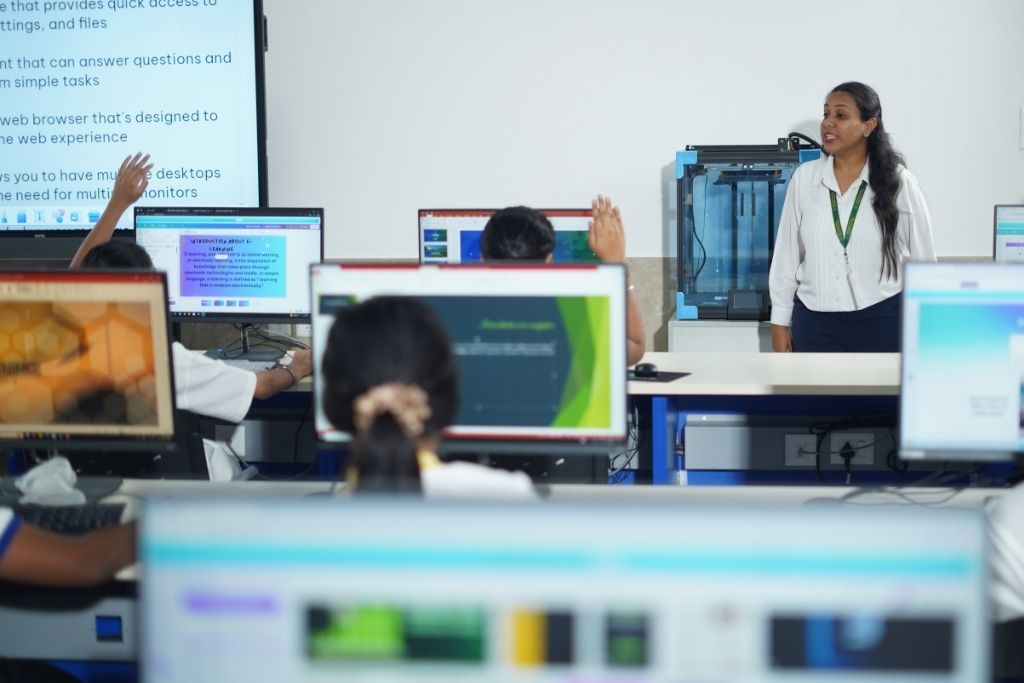
Delhi Public School Gurugram (Sector 67A) takes computer education very seriously and stands out as one of the leading schools in the region for technology-integrated learning. The school’s computer lab is equipped with state-of-the-art technology, providing students with hands-on experience from an early age.
Rather than treating computers as just another subject, DPS Gurugram integrates technology across its curriculum, encouraging students to use digital tools for research, creativity, and problem-solving.
Through well-structured computer classes and access to advanced labs, DPS Gurugram ensures every student builds a strong digital foundation that prepares them for a future driven by technology.
Advantages of Using Computers
Computers offer several benefits that make them useful tools for students and professionals.
1. Large Storage: Computers can store large amounts of information.
2. Speed: Computers can perform calculations and tasks very quickly.
3. Multitasking: Multiple applications can run at the same time.
4. Accuracy: They provide precise results when given correct instructions.
5. Connectivity: Computers connect people around the world through the internet.
6. Automation: Repetitive tasks can be completed automatically.
Also Read: Top 15 Female Freedom Fighters of India
Limitations of Computers
Despite their many advantages, computers also have certain limitations.
1. No Independent Thinking: Computers cannot think independently or make decisions without human input.
2. Dependence on Electricity: They cannot function without power.
3. Security Risks: Computers may face threats from viruses or hackers.
4. Health Concerns: Spending too much time on computers can cause eye strain or posture problems.
Conclusion
Computers have become an important part of students’ everyday lives. They help us learn new topics, complete assignments, communicate with others, and explore information from around the world. Understanding how computers work and learning to use them wisely can make learning more enjoyable and effective.
Schools such as Delhi Public School Gurugram continue to introduce students to technology through modern learning methods. By building computer knowledge early, students can develop valuable skills that will help them succeed in the digital world.
 CHAT
CHAT